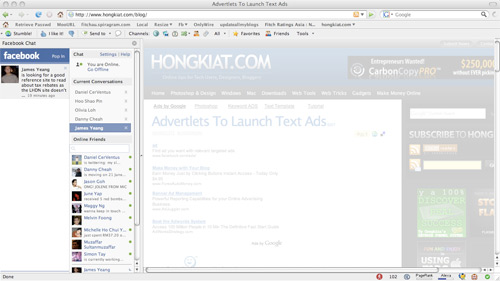
Facebook Chat is cool, at least it allows you to send instant messages to online Facebook contacts. However I’m not really a fan of the chat bar being at the bottom of the page, what if I’ve left Facebook but still wants to remain chatting with my Facebook contacts? If you are using Firefox, you can place the Facebook Chat at the sidebar
Step 1
Look for Bookmarks on the top navigation. Select Organize Bookmarks…
Step 2
Click New Bookmark... tab and enter the following:
* Name: Facebook Chat
* Location: http://www.facebook.com/presence/popout.php
* Check Load this bookmark in sidebar
Step 3
Launch the Firefox sidebar, click Facebook Chat and start chatting with your Facebook contacts within Firefox
Blogger templates
Popular Posts
-
f you have a phone or device, like the iPhone / Android iPad or use the Facebook application and mobile access to Facebook, then you should ...
-
Today we show you how to be notified when a friend changes the information related to work, if they add a new job, if it's modified, or ...
-
How many times have you wanted to find out the people you interact with the most? What are the most spied on people, those that are in your ...
-
A little-known feature in Facebook that lets you decide who shows up in that Friends box. Click that "edit" pencil in your Friends...
-
Want to publish cartoons and emoticons in your status updates of your friends or on message boards? Follow us and we will explain how. Jus...
-
Here’s a small little trick in Facebook that allows you to create a grid view or photo collage out of your friends list. This is how I do i...
-
If you are tired of the same old login screen on Facebook and you want to customize it just like the desktop of your computer then you must ...
-
I’m sure that this has happened to you before. Someone you have ties to, whether it’s a co-worker, your boss, or even worse, a parent, has f...
-
The new version of Skype (5.5) just released and integrates Facebook and Skype. As you will recall that recently drew up an agreement. In ...
-
Facebook Chat is cool, at least it allows you to send instant messages to online Facebook contacts. However I’m not really a fan of the chat...
Blogger news
Blogroll
Categories
Archives
-
▼
2011
(12)
-
▼
septembre
(12)
- The new version of Skype with Facebook included!
- How to insert emoticons and animated gifs on Facebook
- How to remove phone numbers from Facebook
- How to be notified when a friend changes jobs
- How to discover the secret list of friends you vis...
- How to publish Facebook art
- How to change login screen background
- Hide Your Online Status on Facebook Chat from Sele...
- How to Display Selected Pictures Only on your Face...
- Create Photo Collage/Grid-View Of Your Facebook Fr...
- How to “Friend” Someone on Facebook & Hide It From...
- How to Place Facebook Chat On Firefox Sidebar
-
▼
septembre
(12)